.webp "what is server | types | features | how to setup a server | disadvantage and advantages")
What is a Server and its Types?
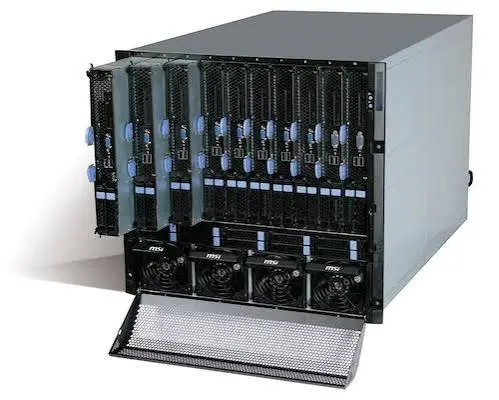
Servers, in computing terms, are powerful computers designed to serve data, applications, and resources to other computers or devices over a network. They enable efficient data management, communication, and collaboration. There are several types of servers, each serving distinct purposes:
Web Servers
Web servers deliver web content to users’ browsers, translating website addresses (URLs) into viewable web pages. Popular web server software includes Apache, Nginx, and Microsoft Internet Information Services (IIS).
File Servers
File servers centralize data storage and sharing within a network. They provide a secure way to access and manage files and folders, improving collaboration among users.
Database Servers
Database servers manage and store databases, allowing users to perform operations on data, such as querying, updating, and deleting. MySQL, Microsoft SQL Server, and Oracle Database are examples of database server systems.
Application Servers
Application servers facilitate the deployment and execution of applications for clients. They handle tasks such as business logic, authentication, and data validation.
Mail Servers
Mail servers manage email communication, handling the sending, receiving, and storage of emails. Examples include Microsoft Exchange Server and Postfix.
Features of Server types
Servers come equipped with a range of features that enhance their functionality and utility:
Scalability
Servers can scale vertically (upgrading hardware within a single server) or horizontally (adding more servers) to accommodate increasing workloads.
Redundancy
Redundancy ensures server availability even in case of hardware failures, minimizing downtime and data loss.
Security
Servers offer advanced security measures, including firewalls, encryption, and authentication protocols, safeguarding sensitive data from unauthorized access.
Remote Access
Administrators can manage servers remotely, enabling efficient troubleshooting, updates, and maintenance.
Virtualization
Servers often utilize virtualization technology to run multiple virtual machines on a single physical server, optimizing resource utilization.
How to Set Up a Server: A Step-by-Step Guide
.webp "what is server | types | features | how to setup a server | disadvantage and advantages")
Setting up a server requires careful planning and execution. Here’s a step-by-step guide to get you started:
Choose the Right Hardware: Select server hardware based on your needs, considering factors like processing power, memory, and storage capacity.
Select an Operating System: Choose an operating system (OS) that aligns with your applications and requirements. Popular choices include Windows Server, Linux distributions, and FreeBSD.
Install Necessary Software: Install essential server software such as web servers, databases, and security tools.
Configure Network Settings: Set up network configurations, including IP addresses, DNS settings, and firewalls, to ensure seamless connectivity.
Implement Security Measures: Apply security patches, configure firewalls, and establish user authentication to protect your server from threats.
Optimize Performance: Fine-tune server performance by adjusting settings, monitoring resource usage, and implementing caching mechanisms.
Backup and Recovery: Regularly back up your server’s data and configurations, enabling swift recovery in case of data loss or system failure.
Advantages of Using Servers

Employing servers offers numerous benefits to individuals and businesses alike:
Centralized Data Management: Servers centralize data storage and access, making it easier to manage and secure critical information.
Enhanced Collaboration: Servers facilitate seamless collaboration among team members by enabling shared access to files and resources.
Improved Performance: Dedicated servers ensure consistent performance, even under heavy workloads, resulting in faster application response times.
Scalability: Servers can scale vertically or horizontally, accommodating growth and changing demands efficiently.
Disadvantages of Using Servers
.webp "what is server | types | features | how to setup a server | disadvantage and advantages")
While servers bring various advantages, they also come with certain drawbacks:
Cost: Setting up and maintaining servers can be expensive, involving hardware, software, and operational expenses.
Complexity: Server setup and management require technical expertise, which might be challenging for beginners.
Maintenance: Servers demand regular updates, security patches, and maintenance tasks, consuming time and resources.
FAQs
Q: Can I use my personal computer as a server?
A: While possible, personal computers lack the reliability, scalability, and security of dedicated server hardware.
Q: What is cloud computing, and how does it relate to servers?
A: Cloud computing utilizes remote servers to deliver various services over the internet, offering flexibility and scalability.
Q: Is a dedicated server necessary for a small business?
A: For small businesses, shared hosting or virtual private servers (VPS) can be more cost-effective alternatives to dedicated servers.
Q: Can I host multiple websites on a single server?
A: Yes, through virtual hosting or virtual private servers (VPS), you can host multiple websites on a single server.
Q: Are servers only used for business purposes?
A: No, servers find applications in various fields, including education, research, entertainment, and more.
Q: What security measures should I implement on my server?
A: Implement firewalls, encryption, regular updates, strong authentication, and intrusion detection systems to enhance server security.
Conclusion
Servers play a pivotal role in modern computing, powering the digital world’s infrastructure. From web hosting to data management, their diverse applications are critical for businesses and individuals alike. Understanding the types, features of server types, advantages, and disadvantages of servers empowers you to make informed decisions regarding your technological needs.